Procenter Systems, Chair Mounted Chair Control Touch Pad Removal / Installation Test and Repair
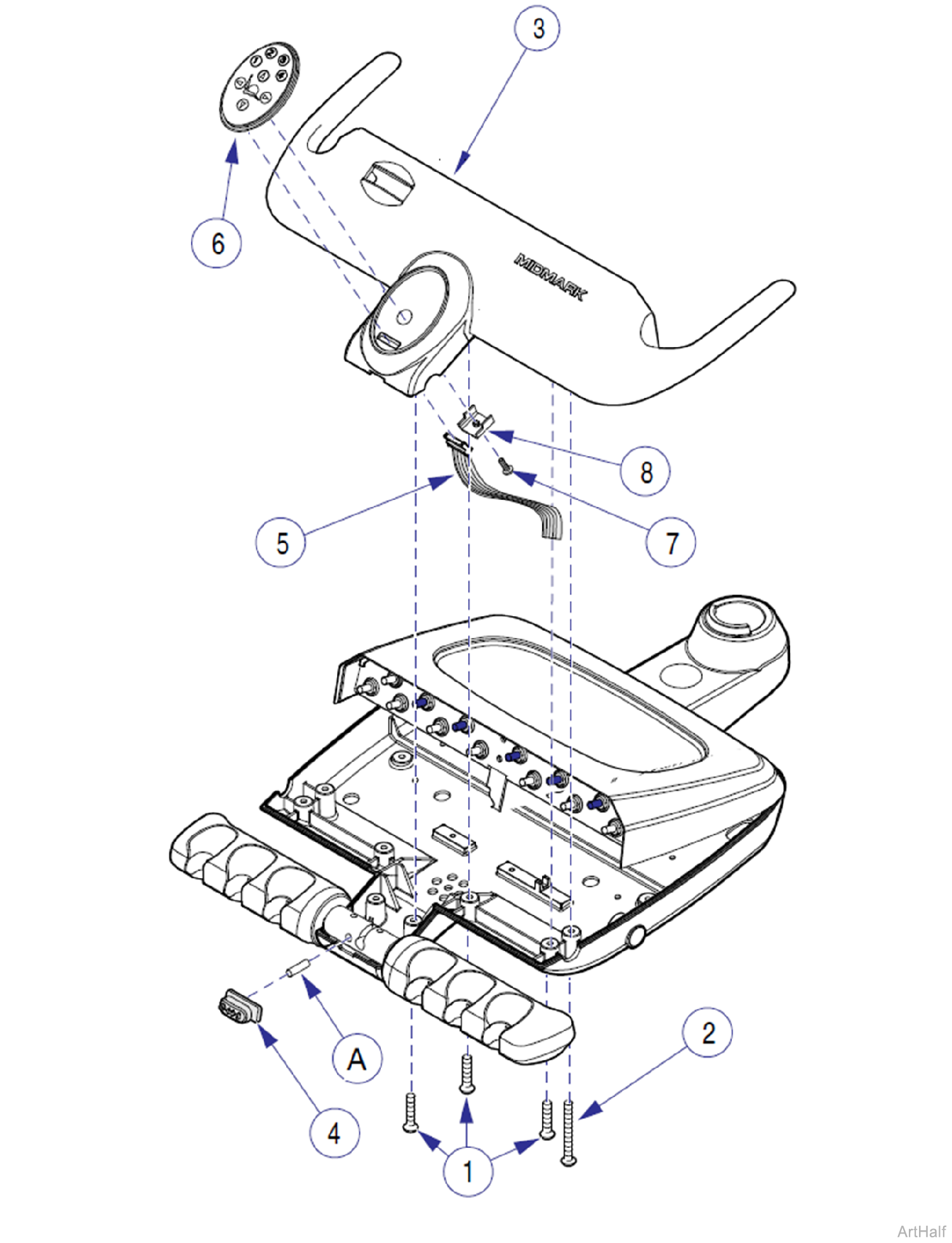
Procenter Systems Chair Control Touch Pad Removal / Installation
 Removal
1.Disconnect all electrical power to operatory.
2.Turn air manual shut-off valve in junction box OFF.
3.Press air button of syringe(s) until all residual air pressure is removed from the system.
Residual air pressure will eject plunger (A) from the master ON/OFF switch valve. Be sure all air pressure is removed from the system before performing the following step.
4.Remove six screws (1) and two screws (2); then partially separate front cover (3) and remove master switch (4).
5.Disconnect wire harness (5) from bevel/touch pad (6).
6.Remove screw (7), bracket (8), and bevel/touch pad (6) from front cover (3).
Installation
1.Secure bevel/touch pad (6) to front cover (3) with bracket (8), and screw (7).
2.Connect wire harness (5) to bevel/touch pad (6).
Ensure that switch valve plunger (A) is in place before performing the following step.
3.Install master switch (4); then position front cover (3) and secure with six screws (1) and two screws (2).
4.Turn air manual shut-off valve in junction box ON, connect electrical power to operatory, and check for proper operation.