Midmark® Dental Delivery PC Board Troubleshooting
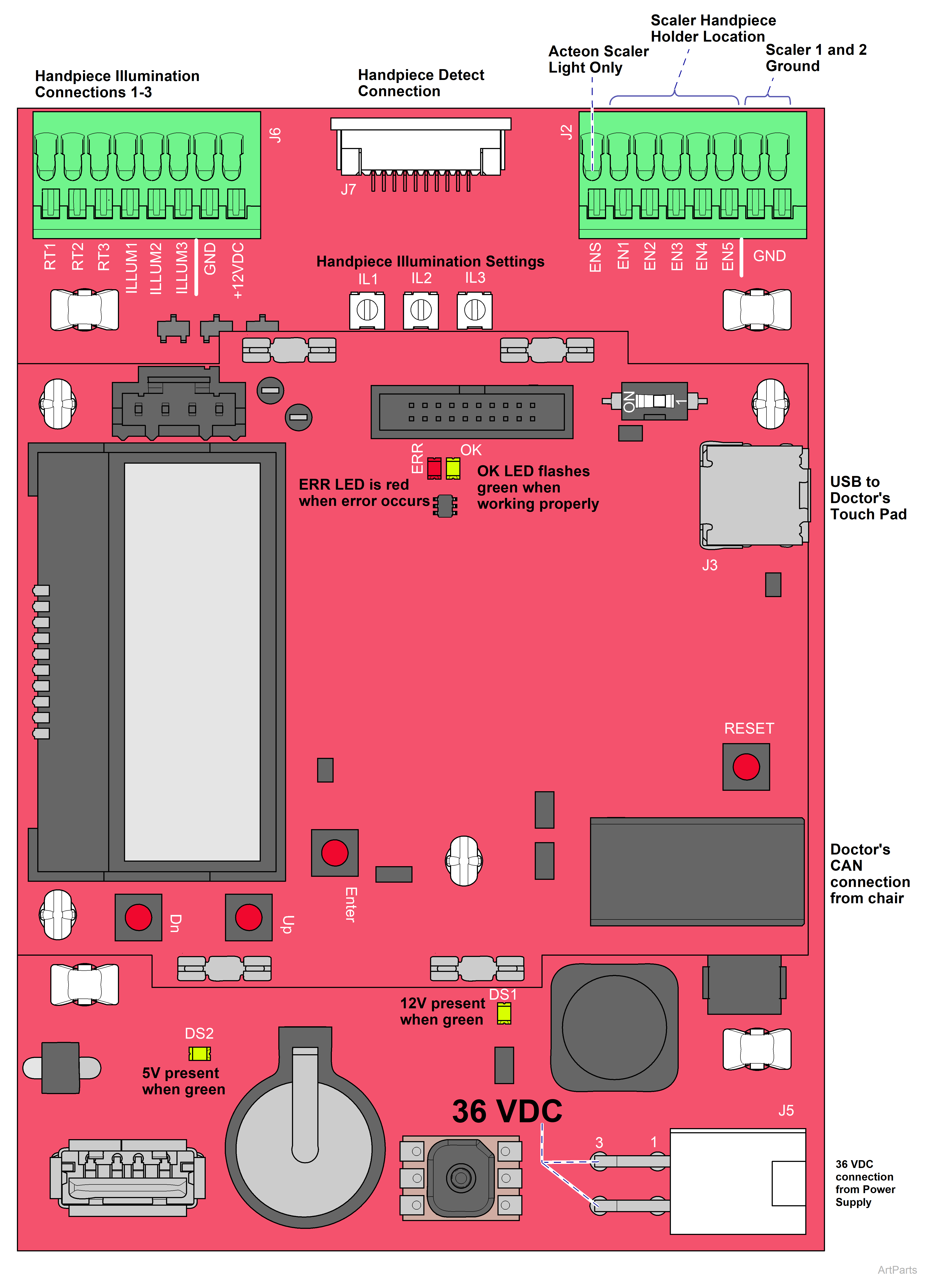
| Symptom | Probable Cause | Check | Solution |
|---|---|---|---|
|
No power |
No 36 VDC at PC board |
Check 36 VDC at J5 pins 3 and 4. |
36 VDC present, replace PC board. |
| 36 VDC present, check replace harness. | |||
|
No 36 VDC from power supply
|
Check power supply fuses. |
Replace fuses. |
|
|
Check incoming power to power supply. |
Plug power supply in. |
||
|
Check for no line voltage to outlet. |
Check facility breaker. |
||
|
Power at outlet with no 36v output from power supply. |
Replace power supply. |
||
|
No 12v |
Missing 12v at Interface board |
N/A |
DS1 should be on (green); if not, replace the Interface board. |
|
No 5v |
Missing 5v at Interface board |
N/A |
DS2 should be on (green); if not, replace the Interface board. |
|
Micro PC board malfunction |
OK light on Micro PC board not flashing |
N/A | Replace Micro PC board. |
|
Error occurred |
Red ERR light on |
N/A | Refer to: Error Code Charts – Delivery System. |